Introduction: The Evolution of Dental Patient Check-Ins
The common dental office is a bustling hub of activity, where precision, efficiency, and patient comfort are paramount. Yet, the very first interaction many patients have with your practice—the check-in process—can often become a significant bottleneck, impacting both operational flow and patient satisfaction. Gone are the days when stacks of paper forms and overwhelmed front desk staff were the norm. Today, technology offers sophisticated solutions to transform this crucial touchpoint. This guide explores the power of the patient check-in kiosk, a modern tool designed to streamline operations, elevate the patient experience, and propel your dental practice into the future.
The Evolution of Dental Patient Check-Ins
For decades, the standard dental office check-in involved a physical form handed to patients upon arrival. This manual process, while familiar, is fraught with inefficiencies. The front desk team juggles appointment verification, insurance details, medical history updates, and consent forms, often while simultaneously managing phone calls and greeting other patients. This intricate dance frequently leads to longer queues, increased wait times, and a higher potential for errors as data is transcribed from paper to digital records. As patient expectations evolve and the demand for seamless digital experiences grows, the limitations of these traditional workflows become increasingly apparent, prompting a critical look at more advanced solutions.
The Bottlenecks of Traditional Front Desk Workflows
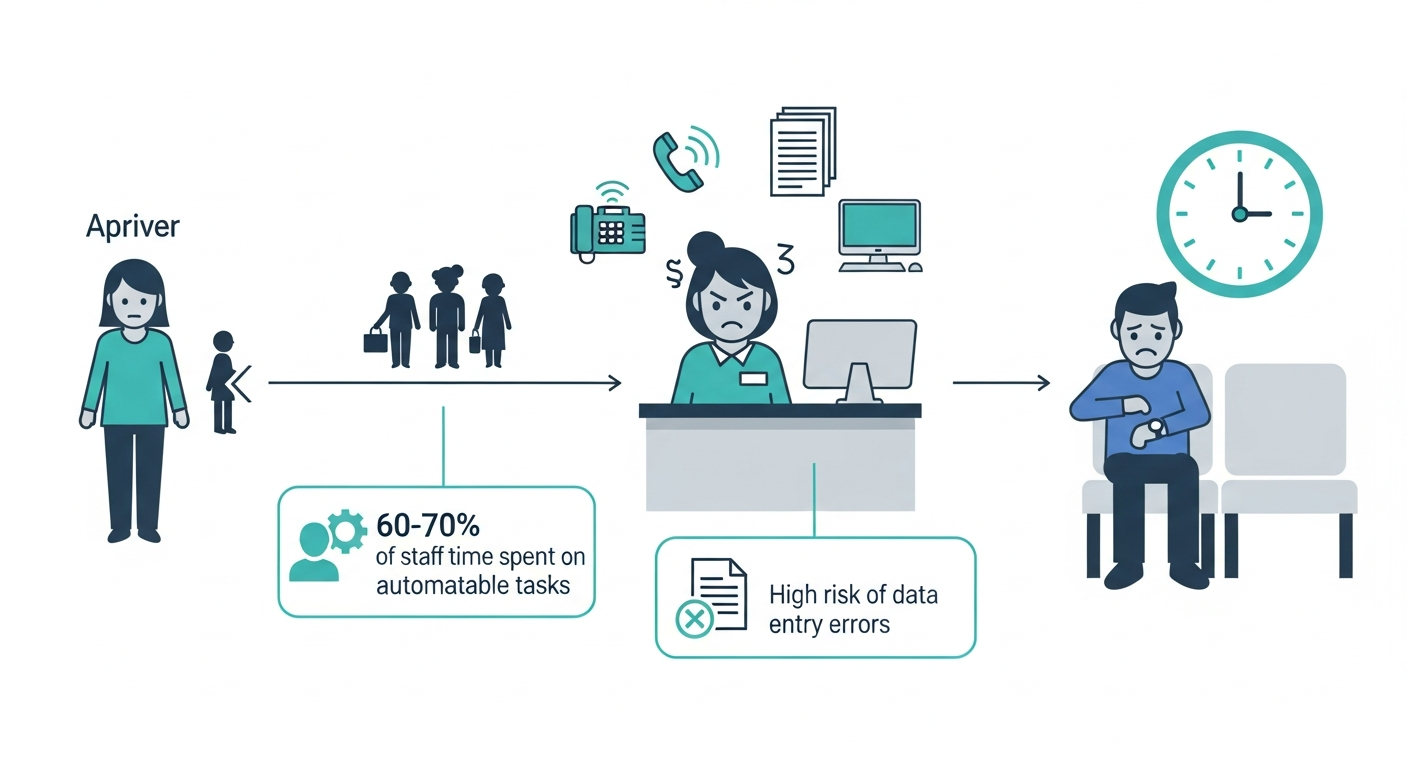 The traditional front desk workflow is often a source of inefficiency, leading to long wait times and a high administrative burden on staff.
The traditional front desk workflow is a primary source of inefficiency and patient frustration. Patients arriving for their appointment often face lengthy queues in the waiting room, contributing to extended overall wait times. The front desk staff are frequently inundated with repetitive administrative tasks. In fact, front desk staff at dental practices spend a majority of their time on tasks that could be automated, such as answering routine calls, sending reminders, and verifying insurance. This constant pressure can lead to employee burnout. Furthermore, the reliance on paper forms introduces significant risks of data entry errors and challenges with secure storage and retrieval, impacting the accuracy of patient records. Flex Dental Solutions, a leading patient engagement software, solves this issue with digital forms.
Introducing the Patient Check-In Kiosk: A Modern Solution
A patient check-in kiosk is a self-service terminal, typically a tablet mounted in a secure enclosure, designed to allow patients to manage their arrival and administrative tasks independently. The self check-in kiosk empowers the patient directly. This technology represents a fundamental shift from manual, staff-intensive processes to an automated, patient-centric approach. It’s a dedicated station designed to expedite the patient check-in process, ensuring a smoother transition from arrival to the treatment room.
The Strategic Advantages: Why Every Dental Office Needs a Kiosk
Implementing a patient check-in kiosk offers a multitude of strategic benefits that extend far beyond a simple technological upgrade. These advantages touch upon operational efficiency, patient satisfaction, data integrity, and the overall modernization of the practice.
Boosting Operational Efficiency and Practice Workflow
Patient check-in kiosks are powerful tools for optimizing practice workflow. By automating many of the administrative tasks traditionally handled by the front desk, these systems significantly reduce the workload on staff. Digital check-in systems automate insurance pre-verification and consent management, reducing employee burnout and improving data entry quality [HealthTech Magazine, 2025]. This allows front desk personnel to dedicate more time to complex patient inquiries, appointment scheduling, and providing a higher level of personal service, rather than being bogged down by routine paperwork. The result is a more fluid and efficient office operation, where the entire patient journey, from arrival to departure, is better managed.
Elevating the Patient Experience and Satisfaction
The impact of a well-implemented kiosk on the patient experience cannot be overstated. For many patients, the check-in process is their initial impression of the practice, and a streamlined, efficient experience sets a positive tone. Patients arriving for their appointment can bypass queues and complete their necessary paperwork at their own pace. This self-service approach caters to modern preferences; 78% of consumers are extremely or very interested in using online tools to provide information and confirm coverage [Kyruus Health, 2023]. By offering a digital, user-friendly interface, often on an iPad or similar tablet, kiosks reduce anxiety and enhance convenience. This proactive approach to managing wait times and administrative tasks directly contributes to higher patient satisfaction scores and fosters greater loyalty to the practice.
Ensuring Data Accuracy and HIPAA Compliance
Accuracy and security are paramount in healthcare. Patient check-in kiosks significantly enhance the integrity of patient information. By digitizing intake forms and updating medical histories directly through the kiosk, the practice minimizes human error associated with manual data entry. Furthermore, reputable kiosk solutions are designed with HIPAA compliance at their core, employing robust security measures to protect sensitive patient data. This includes secure data transmission, encryption, and access controls, ensuring that consent and personal health information are handled with the utmost care and adherence to regulatory standards.
Driving Practice Growth and Modernization
Embracing patient check-in technology is a clear indicator of a practice committed to modernization and forward-thinking patient care. The adoption of kiosks signals to existing and potential patients that the office is invested in offering convenient, efficient, and technologically advanced services. This can differentiate your practice from competitors and attract a broader demographic, particularly younger patients who prefer digital interactions. Moreover, by freeing up staff time and improving operational efficiency, kiosks contribute to a healthier bottom line. This financial impact, combined with improved patient retention due to better patient experience, fuels practice growth.
Kiosk Functionality: Transforming the Patient Journey from Arrival to Appointment
The capabilities of a modern patient check-in kiosk extend far beyond a simple sign-in sheet. These devices are designed to manage multiple facets of the patient's arrival and preparation for their appointment, creating a seamless and comprehensive experience.
The Seamless Check-In Process
Upon arrival, a patient can approach the kiosk and easily identify themselves, often by entering their name and date of birth or scanning a QR code from a prior reminder. The kiosk system then instantly verifies their appointment details, updates their status to "arrived" within the practice management software (PMS), such as Open Dental, and prepares them for the next steps. This immediate confirmation reduces the uncertainty for patients and ensures that the front desk is immediately aware of their arrival, allowing for efficient patient flow management and minimizing wait times.
Digital Intake: Eliminating Paperwork and Streamlining Data Capture
One of the most significant benefits of a kiosk is its ability to completely eliminate paper-based intake. New patients can complete all necessary registration forms, medical history questionnaires, and insurance details directly on the tablet. Existing patients can update their demographic information, insurance coverage, and any changes in their medical history. The system captures this information digitally, ensuring legibility and reducing the risk of data entry errors. Crucially, kiosks can also facilitate the secure electronic signing of consent forms, including treatment consent and privacy policies, all within a HIPAA-compliant environment. This digital intake process not only saves time but also ensures that clinical teams have immediate access to the most up-to-date patient information prior to their appointment.
Secure Payments & Financial Clarity
Patient check-in kiosks can also play a vital role in managing financial aspects of the visit. Many systems allow patients to securely pay co-pays, deductibles, or outstanding balances directly at the kiosk using credit cards or other digital payment methods, like utilizing FlexPayments powered by Stripe. This capability enhances convenience for the patient and accelerates the payment collection process for the practice. It also provides an opportunity to clearly display outstanding balances and explain payment options, fostering financial transparency and potentially reducing patient apprehension about payment.
Enhancing Patient Engagement and Education
Beyond administrative tasks, kiosks can serve as interactive tools to enhance patient engagement. Before their appointment, patients can be presented with their treatment plan for review, offered educational materials about upcoming procedures, or provided with post-appointment care instructions. The kiosk can also be used to solicit patient feedback through satisfaction surveys, providing valuable insights into the patient experience. This multi-functional approach ensures that patients are informed, engaged, and better prepared for their dental care.
Implementing Your Kiosk System: A Practical How-To Guide
Adopting a patient check-in kiosk system involves careful planning and execution. By following a structured approach, dental practices can ensure a smooth transition and maximize the benefits of this technology.
Assessing Your Practice's Needs and Current Workflow
The first step is a thorough assessment of your practice's current workflow. Identify your primary pain points: are wait times excessive? Is data entry a constant struggle? Are you losing patients due to a cumbersome check-in process? Mapping your existing patient flow will highlight areas where a kiosk can have the greatest impact. Determine which functionalities are most critical for your office, whether it's comprehensive digital intake, secure payment processing, or seamless appointment verification.
Integrating with Your Practice Management Software (PMS)
A critical component of a successful kiosk implementation is its integration with your existing Practice Management Software (PMS), like Open Dental. Seamless integration ensures that patient data captured at the kiosk is automatically and accurately synced with your PMS in real-time. This avoids duplicate data entry and provides your front desk and clinical staff with immediate access to updated patient records.
Hardware and Software Considerations
Choosing the right hardware and software, such as Flex Dental Solutions, is essential. Tablets such as iPads, Android devices, or Windows tablets are common choices, each offering different benefits. Consider the durability of the device and whether it requires a protective, healthcare-grade enclosure for hygiene and security. The kiosk software itself should be intuitive, user-friendly, and offer the specific functionalities your practice needs. Features like customizable welcome screens [Source: e.g., mConsent] and multi-language support enhance the patient experience. Security features, including secure enclosures and encrypted data transmission, are paramount.
Configuration and Customization for Your Practice
Once hardware and software are selected, the kiosk needs to be configured to align with your practice's branding and specific needs. This includes customizing the user interface with your office logo and colors, tailoring the intake forms to include practice-specific questions or consent requirements, and setting up preferred language options. The goal is to create a branded, personalized experience that feels like an extension of your practice.
Staff Training and Workflow Adjustment
The successful adoption of a kiosk relies heavily on your staff. Provide comprehensive training to your front desk team, focusing not on replacing their roles, but on how these roles evolve. They should understand how to assist patients who may need help with the kiosk, manage exceptions, and leverage the freed-up time for more patient-centric tasks. Role-playing scenarios and clear protocols for handling common issues are crucial for a smooth transition. Emphasize that the kiosk is a tool to empower them, not to replace them.
Overcoming Challenges and Ensuring a Smooth Transition
Implementing new technology can present challenges, such as staff resistance or initial patient adoption hurdles. Address staff concerns by clearly communicating the benefits and providing adequate training and support. For patient adoption, ensure the kiosk is prominently placed and easily visible, with clear signage. Front desk staff can proactively guide patients towards the kiosk and offer assistance. Technical glitches can occur; have a clear troubleshooting plan and ensure reliable vendor support is available. A phased rollout, starting with a single kiosk and gradually expanding, can also help manage the transition.
Overcoming Challenges and Ensuring a Smooth Transition
The journey to integrating a patient check-in kiosk is largely defined by how effectively potential challenges are anticipated and managed. A proactive approach ensures that the technology serves as an enabler, not a disruption.
Catering to All Patients: Accessibility and User-Friendliness
A truly effective kiosk system must be accessible and user-friendly for all patients, regardless of age, technical proficiency, or physical ability. This means an intuitive interface with clear, simple navigation. Features such as adjustable font sizes and high-contrast display options are vital for patients with visual impairments. Multi-language support ensures that non-English speakers can comfortably complete their tasks. For patients who may struggle with technology, robust staff support protocols are essential. The aim is to provide a digital option without alienating any segment of your patient population.
Data Security and Regulatory Compliance
The sensitive nature of patient information necessitates a strong focus on HIPAA compliance. Reputable kiosk solutions employ end-to-end encryption for data in transit and at rest, secure access controls, and regular security audits. Practices must ensure they enter into Business Associate Agreements (BAAs) with their kiosk vendors. This commitment to data security builds trust with patients and safeguards the practice from potential breaches and regulatory penalties.
Maintenance and Support for Continuous Operation
To ensure the kiosk system consistently supports your workflow, ongoing maintenance and reliable support are critical. This includes regular software updates to patch security vulnerabilities and introduce new features. Hardware requires routine cleaning and occasional checks. Having a clear process for troubleshooting common issues and access to responsive vendor support is vital for minimizing downtime and ensuring the kiosk remains a reliable asset to your office.
Choosing the Right Kiosk Solution: What to Look For
Selecting the ideal patient check-in kiosk solution requires a strategic approach, focusing on how well the technology aligns with your practice's unique needs and goals.
Key Features and Functionality Match Your Needs
Prioritize features that directly address your identified pain points. If paper intake is a major issue, focus on robust digital form capabilities. If managing payments is a bottleneck, ensure secure, integrated payment processing. Consider integration with your PMS, HIPAA compliance, and user-friendliness. A kiosk that offers features like customizable welcome windows and patient education modules can further enhance its value.
Vendor Reputation and Support
Thoroughly vet potential vendors. Look for established companies with a proven track record in the dental or healthcare technology sector. Request references from other dental practices and assess their responsiveness, technical expertise, and the quality of their ongoing support. A vendor that offers comprehensive training and readily available assistance will be invaluable during implementation and beyond.
Cost-Benefit Analysis and ROI Calculation
While the initial investment in a kiosk system is a consideration, it’s crucial to perform a comprehensive cost-benefit analysis. Factor in the savings from reduced paper, printing, and manual data entry. Quantify the benefits of improved staff efficiency, reduced employee burnout, and increased patient retention due to enhanced patient experience. Calculating the return on investment (ROI) will demonstrate the long-term financial advantages of adopting this technology, showing how automated appointment reminders alone can save a practice significantly in lost production.
The Future of Dental Check-Ins: Innovation and Evolution
The patient check-in kiosk is not a static technology; it continues to evolve, promising even more sophisticated integration and intelligence in the future.
AI and Predictive Analytics in Patient Flow
The integration of Artificial Intelligence (AI) and predictive analytics is poised to revolutionize patient check-ins. Future systems will likely leverage AI to predict patient arrival times more accurately, optimize staff scheduling in real-time, and even anticipate potential patient needs or concerns before they arise. This will lead to even more seamless patient flow and a highly proactive approach to patient care within the dental office.
Conclusion: Modernize Your Dental Practice, One Check-In at a Time
The patient check-in kiosk is more than just a piece of technology; it's a strategic investment that can fundamentally transform your dental practice. By addressing the inefficiencies of traditional patient check-in processes, these systems streamline workflow, significantly reduce wait times, and elevate the overall patient experience. They enhance data accuracy, ensure crucial HIPAA compliance, and empower your front desk staff to focus on high-value patient interactions. The benefits extend to driving practice growth and modernizing your office to meet the expectations of today's digitally savvy patients.
To embrace this transformation, begin by assessing your practice's unique needs and current workflow. Prioritize seamless integration with your PMS, such as Open Dental, and carefully select hardware and software that offer robust functionality and security. Invest in comprehensive staff training and be prepared to guide your patients through this new, convenient system. The future of dental check-ins is here, offering a path to greater efficiency, improved patient satisfaction, and a more robust, modern dental practice. By implementing a patient check-in kiosk, you are not just streamlining arrivals; you are building a foundation for enhanced patient care and operational excellence.