Introduction: Revolutionizing Bookings in the Digital Age
In today's hyper-connected world, customer expectations have fundamentally shifted. The days of tedious phone calls and lengthy email exchanges to secure an appointment or make a reservation are rapidly becoming a relic of the past. Consumers now demand instant gratification, intuitive digital experiences, and the ability to engage with businesses on their own terms, at their own convenience. For businesses, meeting this demand isn't just about convenience; it's a critical imperative for survival and growth in an increasingly competitive digital landscape.
The challenge for many businesses, from small local shops to larger service providers, lies in bridging the gap between their operational capabilities and the sophisticated digital tools customers now expect. Traditional booking methods are often inefficient, prone to human error, and fail to capture the high-intent customers actively searching for services online. This is where the power of Google's ecosystem comes into play. By integrating your business directly into the platforms where billions of users begin their search, you can transform your booking process from a point of friction into a powerful engine for growth. This article delves into how mastering "Reserve with Google" integrations can unlock seamless bookings, enhance your business's visibility, streamline operations, and ultimately drive revenue.
The Modern Business Imperative: Visibility and Seamless Access
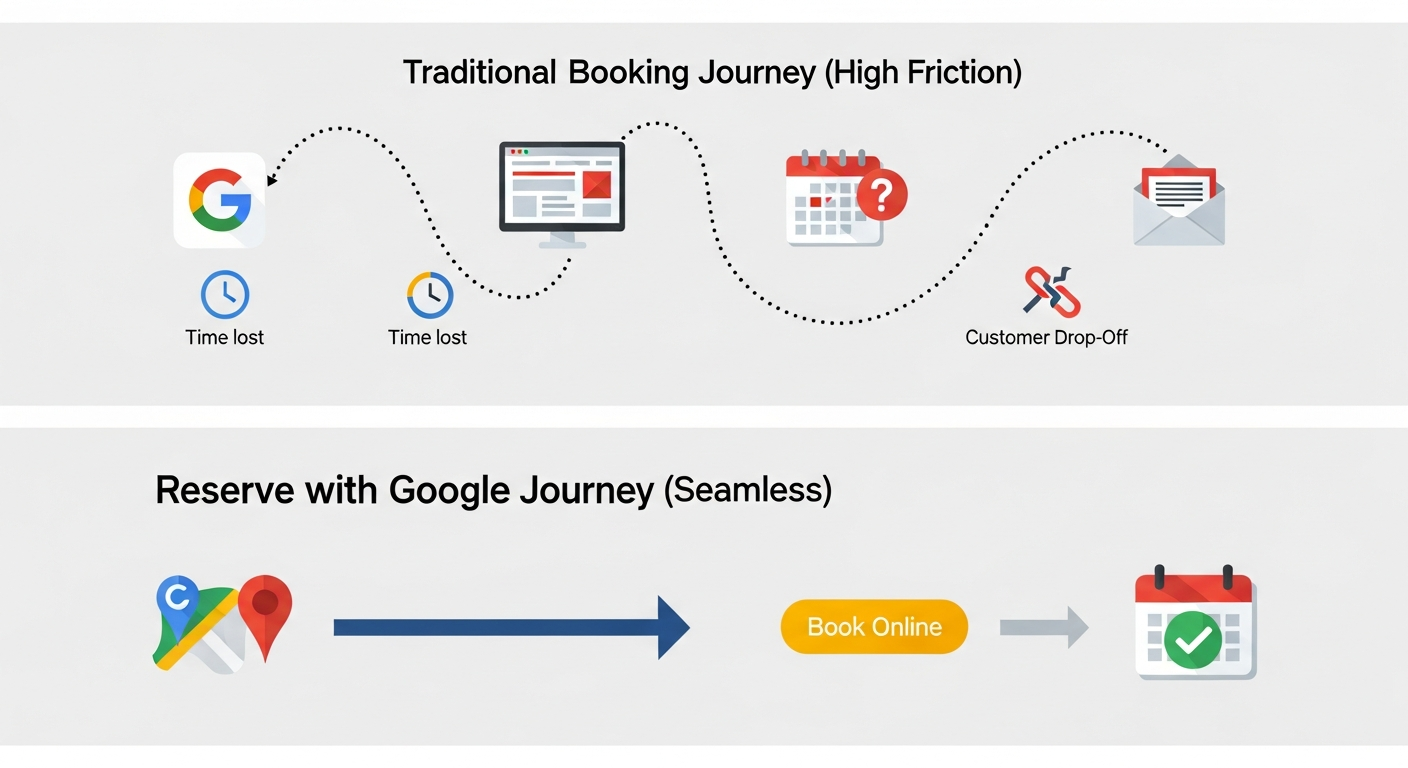 Reserve with Google transforms a complex, multi-step booking process into a seamless, two-click experience, capturing customer intent directly within Google.
The digital age has amplified the importance of visibility. Customers are no longer passively waiting for businesses to appear in their lives; they are actively seeking solutions to their needs through search engines and digital maps. Google, as the undisputed leader in online search and mapping, is the primary gateway for these discovery journeys. For any business aiming to thrive, being easily discoverable within Google Search and Google Maps is paramount.
Beyond mere discovery, however, lies the imperative for seamless access. A customer who finds your business on Google has demonstrated intent. If the path to booking an appointment or making a reservation is complicated, slow, or requires leaving the familiar Google interface, that intent can quickly dissipate. This friction often leads to lost customers and missed revenue opportunities. The modern business must therefore focus not only on being seen but also on facilitating effortless engagement, allowing customers to transition smoothly from discovery to confirmed action.
What is Reserve with Google? Connecting Your Services to Google's Ecosystem
Reserve with Google is a powerful feature that allows customers to book appointments or make reservations directly from Google Search and Google Maps. It acts as a bridge, connecting your existing booking system to Google's vast user base, placing a direct "Book" button on your Business Profile. Flex Dental Solutions, a leader in patient engagement and authorized vendor with Open Dental, utilizes Reserve With Google for its customers. This integration means potential customers can discover your services, view available times, and secure their booking without ever leaving the Google platform.
At its core, Reserve with Google leverages your Google Business Profile (GBP) as the central hub. When a customer searches for a service, your business might appear in the search results or on Google Maps. If you have Reserve with Google enabled, a prominent booking option will be presented alongside your business information. This seamless integration is designed to simplify the customer journey, making it as effortless as possible to connect with your business and secure the services they need.
Why "Mastery" Matters: Beyond Basic Integration for Competitive Advantage
While simply enabling Reserve with Google is a good first step, true "mastery" goes far beyond basic integration. Competitors often focus on the technical connection, but the real advantage lies in strategically optimizing this integration to gain a competitive edge. Mastering Reserve with Google means understanding how to leverage its capabilities to not only increase bookings but also to enhance the customer experience, improve operational efficiency, and drive sustainable business growth.
It involves a deep understanding of how customers interact with Google, how your specific services can be best presented, and how to ensure a flawless booking and post-booking experience. Businesses that move beyond a basic setup and actively manage and optimize their Reserve with Google presence are those that will truly unlock its full potential, turning passive searches into loyal customers and driving significant revenue increases.
The Strategic Advantage: Why Your Business Needs Reserve with Google
In today's digital-first world, businesses that fail to adapt to new customer behaviors risk being left behind. Reserve with Google offers a significant strategic advantage by placing your business at the forefront of customer discovery and booking, directly within the platforms they use most. This integration is not merely a technological add-on; it's a fundamental shift in how you can attract, engage, and serve your clientele.
Expand Your Reach and Visibility: Meeting Customers Where They Search
The most immediate and impactful benefit of Reserve with Google is the dramatic expansion of your reach and visibility. Billions of people use Google Search and Google Maps daily to find local businesses and services. By integrating with Reserve with Google, you place your business directly in front of these high-intent users at the precise moment they are looking for what you offer. Searches for businesses "near me" have seen significant growth, underscoring the importance of local discoverability.
When a potential customer searches for a service you provide, your business can appear prominently in search results or on Google Maps. With Reserve with Google enabled, a direct "Book" button will be visible, allowing users to take immediate action. This dramatically reduces the steps required to book, increasing the likelihood of conversion. Instead of relying on customers to actively seek out your website or call your business, Reserve with Google brings the booking opportunity directly to them, significantly boosting your discoverability and capturing valuable leads.
Streamline the Customer Journey: A Frictionless Booking Experience
The customer journey is a critical determinant of conversion rates. A complicated or lengthy booking process can deter even the most interested potential clients. Reserve with Google is designed to create a frictionless booking experience. Customers can discover your services, view available appointment slots, and complete their reservation all within the familiar and intuitive interface of Google Search or Maps.
This seamless transition eliminates the need for customers to navigate away from Google to a separate website or booking portal. This reduction in friction is crucial, as it minimizes opportunities for abandonment. For example, mobile devices now drive a significant percentage of all hotel reservations, with last-minute bookings on smartphones showing consistent growth. By offering an integrated booking solution directly on Google, you cater to the modern consumer's preference for on-the-go, immediate booking, enhancing satisfaction and conversion rates. This ease of access transforms a potential hurdle into a smooth pathway to becoming a customer.
Boost Operational Efficiency and Reduce Human Errors
Beyond the customer-facing benefits, Reserve with Google significantly enhances internal operational efficiency. Automating the booking process through a connected system reduces the manual workload on your staff. This frees up valuable time that can be redirected towards customer service, strategic planning, or other value-added activities.
Furthermore, manual booking processes are inherently prone to human errors, such as double bookings, missed appointments, or incorrect information entry. By integrating your scheduling system with Google, you ensure that availability is updated in real-time, minimizing the risk of scheduling conflicts. This synchronization between your booking system and Google's platform reduces administrative overhead and the potential for costly mistakes, leading to smoother operations and improved staff productivity.
Drive Growth: Increased Bookings and Revenue Potential
The ultimate strategic advantage of Reserve with Google lies in its direct impact on business growth and revenue. By expanding reach, streamlining the customer journey, and boosting operational efficiency, you are naturally positioned to receive more bookings. Venues that utilize Reserve with Google have seen demonstrable increases in bookings and new customer acquisition rates.
Studies indicate that businesses employing online booking systems often experience substantial revenue increases. Some local businesses have reported surges of up to 120% in revenue after implementing such solutions. Reserve with Google, by tapping into Google's massive user base and offering an ultra-convenient booking method, can significantly contribute to this growth. It captures high-intent leads, converts them more effectively, and provides a scalable platform to handle increased demand, directly translating into higher revenue and a more robust bottom line.
Understanding How Reserve with Google Works
To effectively leverage Reserve with Google, it's essential to grasp its underlying mechanics and how it integrates your business into the Google ecosystem. This system is designed to create a cohesive experience for both the customer and the business owner, facilitating seamless transactions from initial search to confirmed reservation.
The Core Connection: Your Booking System and Google
The foundation of Reserve with Google lies in its connection to your existing booking system. Google partners with a variety of third-party scheduling and booking platforms. When you enable Reserve with Google, you are essentially creating a digital handshake between your chosen booking system and Google's search and maps interfaces.
This integration allows Google to pull real-time availability information from your booking system. When a customer clicks the "Book" button on your Google Business Profile, they are interacting with a system that is directly linked to your service offerings and your calendar. This synchronization is crucial for ensuring accuracy and providing an up-to-date booking experience. Your booking system acts as the engine, managing appointments, services, and staff availability, while Google acts as the primary storefront and customer acquisition channel.
The Customer's Perspective: From Search to Confirmed Reservation
For the customer, the process is remarkably straightforward and intuitive. A user searching on Google for a service, such as "hairdresser near me" or "dentist appointment," will see relevant businesses in the search results or on Google Maps. If your business is set up with Reserve with Google, a "Book" button will appear directly on your Google Business Profile listing.
Clicking this button presents the customer with a curated view of your available services and appointment slots, directly pulled from your integrated booking system. They can then select their preferred service, choose a date and time, and proceed to confirm the reservation. In many cases, payment can also be handled directly through this integrated flow, adding another layer of convenience and security. Once confirmed, the customer receives a confirmation, and the appointment is automatically added to your business's calendar via your booking system.
What Services Can Be Booked? Tailoring Your Offerings
Reserve with Google is versatile and can accommodate a wide range of services across various industries. The key is to clearly define and list what you offer within your integrated booking system. This typically includes:
- Specific Services: Clearly name and describe each service (e.g., "Men's Haircut," "Deep Tissue Massage," "Initial Dental Consultation," "Table Reservation").
- Appointment Durations: Specify the time required for each service.
- Pricing: While not always mandatory for initial setup, including pricing can enhance transparency.
- Staff Availability: For businesses with multiple staff members, you can often specify which staff are available for certain services.
The system allows for customization, enabling businesses to present their offerings in a way that is most appealing and informative to potential customers. Whether you offer simple appointments, timed services, or table reservations, Reserve with Google can be adapted to fit your business model. Food-related bookings, for instance, have seen significant year-over-year increases, demonstrating the growing demand for booking experiences around specific activities.
Getting Started: Setting Up Your Reserve with Google Integration
Implementing Reserve with Google is a strategic move that requires a structured approach. The process involves optimizing your online presence on Google and connecting it with a compatible scheduling system. By following these steps, you can ensure a smooth and effective integration.
Prerequisite: Optimizing Your Google Business Profile
Your Google Business Profile (GBP) is the cornerstone of your Reserve with Google integration. A well-optimized GBP ensures that customers can find you easily and that the information presented is accurate and appealing. Before enabling booking, ensure your GBP includes:
- Accurate Business Name, Address, and Phone Number (NAP): These details must be consistent across all online platforms.
- Correct Business Hours: Keep your opening and closing times up-to-date, including any holiday hours.
- Detailed Service Listings: Clearly define the services you offer, including descriptions and, if applicable, prices.
- High-Quality Photos and Videos: Showcase your business, products, and services.
- Compelling Business Description: Highlight what makes your business unique.
- Customer Reviews: Encourage and respond to customer reviews to build trust and credibility.
A complete and accurate GBP not only improves your local SEO but also provides customers with the essential information they need to make a booking decision.
Choosing and Connecting a Supported Booking System
Reserve with Google works by integrating with approved third-party booking platforms. You will need to choose a booking system that is compatible with Reserve with Google. Many popular scheduling software providers offer this integration. When selecting a system, consider:
- Compatibility: Ensure the system is officially listed as a Reserve with Google partner.
- Features: Does it meet your business needs for scheduling, client management, and payments?
- Ease of Use: Is it intuitive for both your staff and your customers?
- Pricing: Does it fit within your budget?
Once you have chosen a compatible booking system, you will typically need to link your Google Business Profile to your chosen platform through the booking system's interface or through the Google Business Profile manager. This connection allows for the seamless flow of information regarding services, availability, and bookings.
Defining and Listing Your Services and Appointment Options
With your booking system connected, the next crucial step is to precisely define the services you wish to offer through Reserve with Google. This involves:
- Service Names: Use clear, concise, and customer-friendly names.
- Service Descriptions: Provide brief but informative descriptions that highlight the value of each service.
- Duration: Accurately set the time required for each service. This is essential for accurate scheduling and availability.
- Pricing: If your booking system supports it and you wish to display prices on Google, set them accurately.
- Staff Assignment: If applicable, assign specific staff members to services, allowing customers to book with their preferred professional.
The more clearly and accurately you define your services, the better the customer will understand what they are booking, leading to fewer misunderstandings and greater satisfaction.
Managing Your Calendar and Availability
The accuracy of your calendar and availability is paramount to the success of Reserve with Google. Your integrated booking system should automatically sync with Google, reflecting real-time openings. However, proactive management is key:
- Keep Your Calendar Updated: Ensure all appointments, whether booked through Google or through other channels (phone, walk-in), are reflected in your primary booking system.
- Block Off Unavailable Times: Manually block out any personal time, holidays, or closed periods in your booking system to prevent bookings during these times.
- Set Buffer Times: Configure buffer times between appointments if needed for cleaning, setup, or travel between clients.
- Monitor Sync Status: Periodically check that your booking system and Google are syncing correctly to avoid discrepancies.
Accurate availability management is vital to maintaining customer trust and ensuring a smooth operational flow, preventing double-bookings or the frustration of booking an unavailable slot.
Mastering Reserve with Google: Advanced Strategies for Optimization
Once your Reserve with Google integration is live, the journey to truly mastering it begins. This involves implementing advanced strategies to enhance visibility, optimize the booking experience, and maximize the return on investment. Moving beyond the basic setup unlocks the full potential of this powerful tool.
Elevating Your Google Business Profile for Booking Success
Your Google Business Profile is not just a listing; it's a dynamic marketing tool. To maximize bookings through Reserve with Google, continuously optimize your GBP:
- Leverage Google Posts: Regularly share updates about new services, promotions, or special offers through Google Posts. This can draw attention and encourage bookings.
- Respond to Q&A: Proactively answer questions potential customers might have. This builds confidence and clarifies service offerings.
- Encourage and Respond to Reviews: Positive reviews build social proof, while thoughtful responses show excellent customer care. Address any negative feedback constructively.
- Utilize High-Quality Media: Regularly update photos and videos to keep your profile fresh and visually appealing. This is particularly important for service-based businesses where visual appeal matters.
An optimized GBP acts as a powerful magnet, drawing customers towards the booking option.
Enhancing the Booking Experience with Payment Integrations
Integrating payment processing directly into the booking flow can significantly enhance convenience and reduce no-shows. Many supported booking systems allow for secure payment integration. This can include:
- Online Payments: Allowing customers to pay the full amount or a deposit at the time of booking.
- Secure Transaction Processing: Ensuring customer payment details are handled safely.
- Reduced No-Shows: Requiring payment or a credit card hold can deter cancellations and no-shows, directly impacting revenue and operational predictability.
When customers can complete the entire transaction, from booking to payment, in one seamless flow, their likelihood of completing the process increases dramatically. This is particularly relevant in industries where advance payment is common or expected.
Leveraging Advanced Scheduling Features
Beyond basic appointment booking, explore the advanced scheduling features offered by your integrated system:
- Customizable Appointment Slots: Offer flexible booking windows that suit your operational capacity and customer needs.
- Staff Scheduling and Preferences: Allow customers to book with a specific staff member if desired, or let staff manage their own availability within the system.
- Buffer Times and Service Dependencies: Configure specific time blocks between appointments or set up services that must be booked sequentially.
- Resource Management: For businesses that require specific equipment or rooms, advanced systems can manage these resources alongside staff availability.
By fine-tuning these scheduling parameters, you ensure optimal resource utilization and a more efficient, customer-friendly booking process.
Strategic Pricing and Availability Management
Mastering Reserve with Google also involves strategic pricing and availability. Consider:
- Dynamic Pricing: If your booking system supports it, explore offering different prices for peak versus off-peak times, or for premium services.
- Tiered Service Offerings: Present different levels of service with varying prices and durations to cater to a wider range of customer needs and budgets.
- Promotional Availability: Strategically open up specific slots for promotions or last-minute deals to fill gaps in your schedule.
- Peak Demand Management: Analyze booking data to identify peak times and ensure sufficient availability is offered to capture these high-demand periods.
Thoughtful management of pricing and availability can not only increase bookings but also maximize the revenue generated from each slot.
Delivering an Exceptional Client Experience from Start to Finish
The integration of Reserve with Google is more than just a transactional tool; it's an opportunity to enhance the entire client experience. From the initial discovery phase to post-booking follow-up, every touchpoint matters in building loyalty and encouraging repeat business.
Pre-Booking Engagement: Making it Easy to Find and Choose You
The Reserve with Google integration begins the client experience the moment a customer discovers your business on Google Search or Maps. Ensuring this pre-booking phase is positive is critical:
- Clarity and Transparency: Your Google Business Profile and the integrated booking interface must clearly present your services, pricing, and availability. Ambiguity here can lead to confusion and lost bookings.
- Visual Appeal: High-quality photos and videos on your GBP make your business more attractive and help customers visualize the service they will receive.
- Informed Decision-Making: By providing all necessary information upfront, you empower customers to make informed choices, increasing their confidence in booking with you.
A smooth and informative discovery process sets a positive tone for the entire client relationship.
Post-Booking Communication: Building Trust and Reducing No-Shows
The client experience doesn't end once the booking is confirmed. Effective post-booking communication is essential for confirming the reservation, reducing no-shows, and fostering a sense of preparedness and trust.
- Automated Confirmations: Ensure immediate confirmation emails or SMS messages are sent to clients upon booking. These should include all relevant details: service, date, time, location, and any specific instructions.
- Appointment Reminders: Implement automated reminder notifications for clients leading up to their appointment. These can be sent via email or text message and significantly reduce no-show rates. Some studies suggest that effective reminder systems can drastically reduce the cost associated with missed appointments.
- Pre-Appointment Information: For certain services, providing pre-appointment instructions (e.g., what to bring, how to prepare) can enhance the client's experience and ensure they are ready for their appointment.
- Feedback Requests: After the service is completed, consider automated requests for reviews or feedback. This shows you value their opinion and helps you continuously improve your services.
By nurturing the client relationship beyond the initial booking, you build trust, encourage repeat business, and cultivate positive word-of-mouth.
Integrating Reserve with Google into Your Overall Client Management
For maximum impact, Reserve with Google should not operate in isolation. It should be seamlessly integrated into your broader client management and marketing strategies.
- CRM Synchronization: If your booking system integrates with a Customer Relationship Management (CRM) platform, ensure booking data flows into your CRM. This provides a holistic view of your customer interactions, preferences, and history.
- Marketing Automation: Leverage booking data to segment customers for targeted marketing campaigns. For example, clients who booked a specific service could receive follow-up offers related to that service.
- Customer Service Alignment: Ensure your customer service team is aware of bookings made through Google and equipped to handle any related inquiries. The information presented on Google should align with what customers are told directly.
By treating Reserve with Google as a key component of your overall client management strategy, you can ensure a consistent and high-quality experience across all touchpoints, from initial discovery to ongoing relationship building.
Measuring Success: Tracking ROI and Insights
To truly master Reserve with Google, you must move beyond simply enabling the feature and actively measure its performance. Tracking key metrics and analyzing the data generated will provide invaluable insights into its effectiveness and guide further optimization efforts.
Key Metrics to Monitor for Reserve with Google Performance
Several key performance indicators (KPIs) can help you understand the impact of Reserve with Google on your business:
- Booking Volume: The total number of appointments or reservations booked directly through the Google integration.
- Conversion Rate: The percentage of users who view your booking options on Google and then complete a reservation. This is a crucial indicator of how effective your service presentation and booking process are.
- New Customer Acquisition Rate: The percentage of bookings originating from Reserve with Google that are from new customers. This highlights the platform's effectiveness in attracting fresh clientele.
- Revenue Attributed to Reserve with Google: Track the total revenue generated from bookings made via the integration. This allows you to directly measure the financial impact.
- Customer Acquisition Cost (CAC) via Google: By comparing the cost of using your booking system and any related marketing efforts against the revenue generated, you can determine the CAC for bookings originating from Google.
- Website Traffic/Referrals from Google: While Reserve with Google aims to keep users on Google for booking, monitor if your overall Google traffic or direct booking page visits increase as a result of improved visibility.
By diligently tracking these metrics, you can quantify the success of your Reserve with Google strategy and demonstrate its value to your business.
Conclusion: Embrace the Future of Seamless Bookings
In an era defined by digital convenience, mastering Reserve with Google is no longer a luxury but a strategic necessity for businesses seeking to thrive. By seamlessly integrating your services into the world's most powerful search and mapping platforms, you unlock unprecedented reach, attract high-intent customers, and transform the booking process into an effortless, customer-centric experience.
The advantages are clear: expanded visibility in Google Search and Maps, a frictionless customer journey that leads to higher conversion rates, and significant boosts in operational efficiency by automating scheduling and reducing human error. Furthermore, the potential for increased bookings and revenue is substantial, with businesses seeing demonstrable growth from this integration. From optimizing your Google Business Profile and choosing the right booking system to leveraging advanced scheduling features and ensuring robust post-booking communication, every step contributes to a superior client experience.
As the digital landscape continues to evolve, staying ahead means embracing tools that simplify customer interaction and drive business growth. Reserve with Google provides a powerful framework to achieve these goals. By understanding its mechanics, meticulously setting it up, and continuously optimizing its performance through data-driven insights, you position your business for sustained success. Don't just integrate; master Reserve with Google and unlock a future of seamless bookings, satisfied customers, and a more prosperous business.