-1.png)
Part 3 of 3: Unexpected Closures with FlexMobile
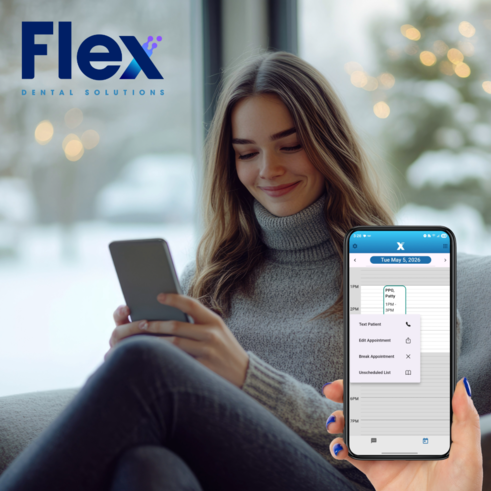
In many dental practices, an overnight closure means someone braves the roads to reach the schedule, or works the phones from memory and a printed list. There’s a safer place to start: somewhere between the snooze button and the first sip of coffee, phone in hand. For Open Dental practices, FlexMobile puts the whole day in your pocket, so your team can reach patients before they leave home and reschedule from the kitchen table. A hard freeze, a tornado warning, a hurricane that shifts course overnight, or a power outage- patients hear from you before they grab their keys, and your team starts the day calm and in control.
Does Your Open Dental Practice Have a Plan for Unexpected Closures?
Part 1 of this series covered planned closures, and Part 2 covered same-day changes during office hours. Unexpected closures are the hardest of the three because changes happen overnight, and the schedule lives on computers across town.
How the night unfolds, a simple plan for unexpected closures gives your practice:
- Peace for your team: everyone knows to reach for their phone rather than driving to a dark office.
- Timely notice for your patients: the earliest appointments hear the news before they leave home.
- Stability for your schedule: rescheduling starts the same morning, synced with Open Dental.
All it asks of you ahead of time: FlexMobile on the phones of the people who manage your schedule, and a short closure text ready to paste.
What Does an Unexpected Closure Look Like Without a Plan?
Picture a stormy morning with no plan in place:
The 5:45 a.m. Text: the owner wakes to icy roads and a travel advisory.
The Login Problem: the schedule lives on the office computers, and no one can see who’s coming in.
The Guesswork: the team tries to remember who’s booked first and starts calling from memory.
The First Arrival: the 7:30 patient pulls in and finds the lights off.
The Rebooking Backlog: the next open day starts with apologies and a stack of appointments to rebook.
A little planning turns a surprise morning into a simple change of plans.
What Happens When the Team Wakes Up to a Closure?
Here is how an unexpected morning often unfolds without mobile access:
The Owner: gets a 5:45 a.m. call: the building lost power overnight.
The Office Manager: planned ahead with a printout, but a paper schedule can’t text a patient, and it was never meant to leave the office.
The Patient: pulls into the lot at 7:30 for a cleaning and finds a dark building.
Not quite the morning anyone had in mind, and the whole day starts a few steps behind.
When the morning takes a turn, a backup plan makes all the difference.
Why Does a Mobile Option Beat Waiting for the Office to Open?
With today’s first patient due at 7:30 a.m., a head start from home goes a long way.
|
What to consider |
Waiting for the office |
FlexMobile from home |
|
Who hears first |
Most stay home on a guess; the rest find a closed door |
The earliest patients, before they leave home |
|
Team time needed |
A drive into the office, followed by an afternoon of phone calls. |
A few minutes from home |
|
Rescheduling |
Waits for the next open business day |
Starts the same morning |
|
Schedule accuracy |
Updated manually later on |
Synced with Open Dental in real time |
How Flex Helps
FlexMobile keeps your Open Dental practice in your pocket, set up for the way each person on your team works:
- A view made for each person: every team member gets their own setup and permissions, showing the operatories they need and texting access that fits their role.
- Secure, one-touch sign-in: biometric login keeps the schedule protected and ready the moment you need it.
- Two-way texting from the office number: patients get real-time answers, and no one shares a personal number.
- Booking from anywhere: create appointments for new and existing patients right from your phone, and Flex sends the intake or update forms, reminders, and confirmations automatically.
- The day moved with a tap: reschedule an appointment, break it, or send it to the unscheduled list in seconds.
Every change syncs back to Open Dental, so when the office opens again, the schedule already matches what happened at home.
Practices that use Mango Voice can go one step further. Tap a patient’s phone number in FlexMobile, and the Mango app places the call from your office line, not your personal cell. See how calls get easier with Mango.
What Should You Do First When Weather Keeps You Home?
A clear order keeps a stressful morning calm:
- Confirm the closure and let the team know. A quick call or your usual group text gets everyone on the same plan.
- Reach the earliest patients first. Text each morning patient from FlexMobile before they leave home.
- Cover the rest of the day. It only takes one person to keep the day’s production on track. If your practice has remote access to its office computers, one text through the Advanced Patient List, covered in Part 2, reaches the rest of the day’s patients.
- Reschedule as replies come in. Move each appointment to a new time while the patient is still in the conversation.
- Clear what’s left. Send any remaining appointments to the unscheduled list so nothing slips.
Is Your Team Ready to Run the Day From Home?
Now picture the same morning with FlexMobile:
The 5:45 a.m. Decision: the owner confirms the closure, and the team knows exactly what to do.
The Schedule in Hand: the whole day opens up on FlexMobile, right from the couch.
The First Texts: the earliest patients hear the news before reaching for their keys.
The Skipped Commute: no one makes the drive to a dark building.
The Smooth Restart: appointments are already moved, reminders and confirmations go out on their own, and the next open day starts on track.
Together, the three parts of this series give your practice a plan for every kind of closure: FlexBlast email when you can plan ahead, APL texts when plans change during the day, and FlexMobile when the news arrives before the office opens.
What would peace of mind feel like on your next unexpected day off? See it in action. Book a Demo.
Frequently Asked Questions
Can I reschedule dental patients from my phone? Yes. FlexMobile lets you move, break, or create appointments for new and existing patients, and every change syncs with Open Dental in real time.
Can I text patients without giving out my personal number? Yes. FlexMobile texts patients from your office number. For more ways to stay reachable when the office is closed, see The After-Hours Patient Experience.
Can I control what each team member sees in FlexMobile? Yes. Each user gets their own setup and permissions, from which operatories appear on their schedule to whether they can view and send texts.
Does FlexMobile work with Open Dental? Yes. FlexMobile syncs with your Open Dental schedule and patient records in real time.
Which Flex tool should I use for an office closure? FlexBlast email when you have a day or more of notice, APL texts for same-day changes, and FlexMobile when your team needs to manage the day from home.
-2.png)
.png)
.png)