Unleashing Your Practice's Potential with Open Dental API Integration
In the rapidly evolving landscape of dental healthcare, efficiency, accuracy, and seamless data flow are no longer luxuries but necessities. Dental practices are increasingly adopting sophisticated software solutions, such as Flex Dental Solutions, to manage every facet of their operations, from patient scheduling and clinical notes to billing and compliance. At the heart of this digital transformation lies the power of integration, and for practices utilizing Open Dental, the Application Programming Interface (API) offers a robust gateway to unlock unparalleled potential.
This guide is designed to demystify Open Dental API integration, providing a comprehensive roadmap for practices looking to connect their systems, automate workflows, and ultimately elevate both operational efficiency and patient care. We will explore the core concepts of the Open Dental API, detail the strategic planning and setup required, guide you through practical interactions, and delve into advanced integration strategies. Whether you're a practice administrator seeking to streamline operations or a developer looking to build custom solutions, this guide will equip you with the knowledge to harness the full power of Open Dental's connected capabilities.
The Evolution of Dental Practice Management Software
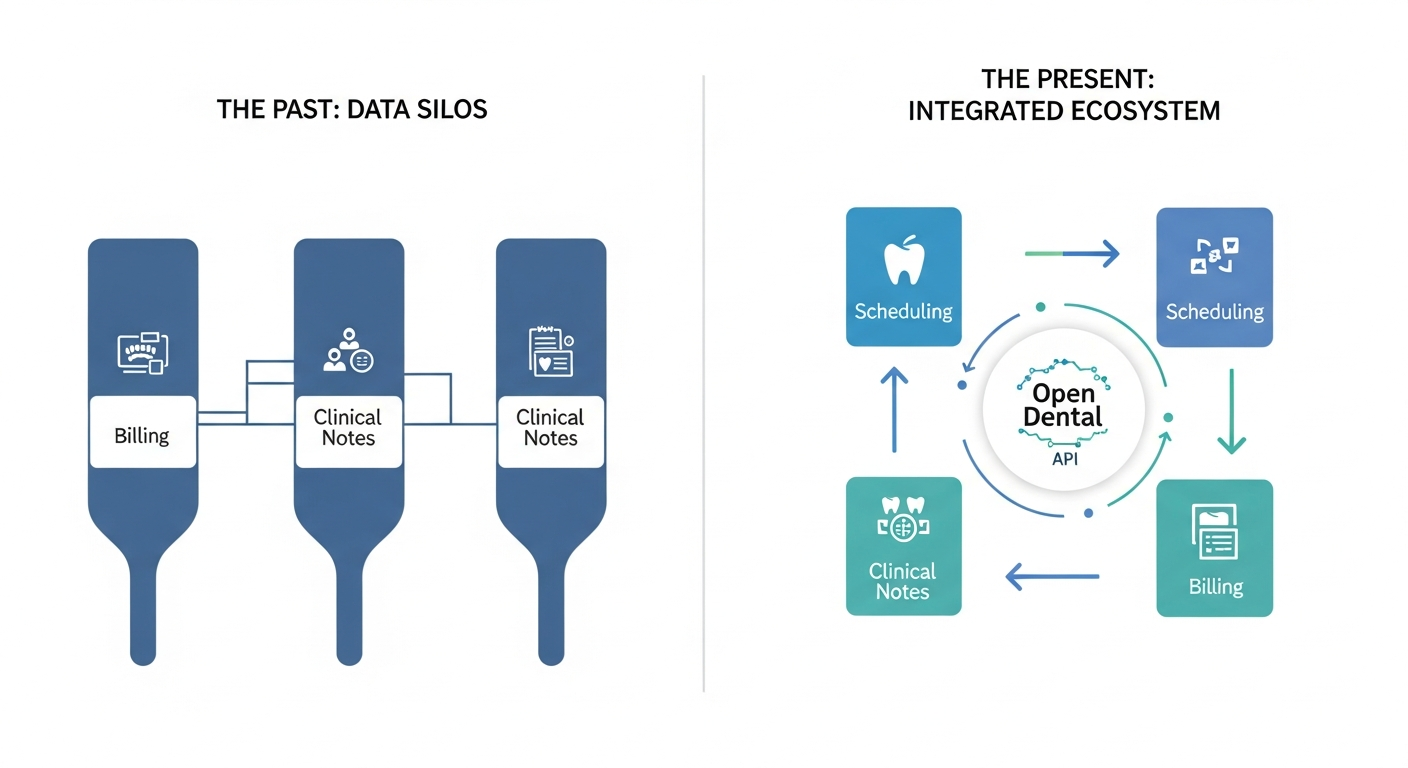 The evolution from isolated data silos to a connected ecosystem powered by the Open Dental API.
The journey of dental practice management software mirrors the broader technological advancements that have reshaped industries. Early systems were primarily digital filing cabinets, digitizing paper charts and basic scheduling. Over time, these systems grew in complexity, incorporating features for billing, insurance processing, imaging, and patient communication. The advent of electronic health records (EHRs) further enhanced data management, focusing on clinical information capture and accessibility.
However, the true power of modern software lies not just in its internal capabilities but in its ability to communicate with other systems. Standalone solutions, while functional, often create data silos, leading to manual data re-entry, potential errors, and fragmented workflows. This limitation has spurred the evolution towards integrated ecosystems where different software applications can communicate and exchange data seamlessly. For Open Dental, this evolution has culminated in a powerful API that serves as a bridge, connecting its robust feature set to a world of possibilities.
Why API Integration is Essential for Modern Dental Practices
API integration is no longer an optional upgrade; it's a strategic imperative for dental practices aiming to thrive in today's competitive environment. The benefits are far-reaching and directly impact operational efficiency, patient experience, and the ability to leverage data for informed decision-making.
Firstly, efficiency and automation are significantly enhanced. Imagine automating appointment reminders, synchronizing patient data between your practice management system and a patient portal, or automatically updating treatment plans in accounting software. APIs eliminate the need for manual data transfer, reducing the risk of human error, saving valuable staff time, and allowing teams to focus on higher-value tasks.
Secondly, integration dramatically improves the patient experience. Seamlessly connected systems can lead to faster check-ins, more accurate billing, personalized communication, and greater transparency. For example, a patient portal integrated via API can provide real-time access to appointment schedules, treatment history, and secure messaging, fostering patient engagement and satisfaction.
Thirdly, API integration enables data-driven decision-making. By consolidating data from various sources, practices can gain deeper insights into key performance indicators, patient demographics, treatment trends, and operational bottlenecks. This comprehensive view empowers practice leaders to make informed strategic decisions, optimize resource allocation, and identify opportunities for growth and improvement.
Finally, in an era where interoperability is increasingly mandated and expected, API integration positions a practice for future scalability and competitiveness. Practices that embrace connected systems are better equipped to adapt to new technologies, comply with evolving regulatory requirements, and partner with other healthcare providers or service vendors.
What This Guide Will Cover: Your Roadmap to Seamless Connection
This guide is meticulously structured to provide a comprehensive yet accessible understanding of Open Dental API integration. We will begin by laying the groundwork, exploring the Open Dental API ecosystem and its core concepts. Subsequently, we will guide you through the essential steps of strategic planning and setup, ensuring your practice is fully prepared. The guide will then transition to practical, hands-on interactions, demonstrating how to make your first API calls and work with core data. Finally, we will delve into advanced integration strategies and crucial aspects of optimization, troubleshooting, and future-proofing your connected solutions.
Our journey will cover:
- Understanding the Open Dental API and its resources.
- Identifying key API components like endpoints, HTTP methods, and authentication.
- Developing a strategic plan, including assessing needs and prerequisites.
- Detailed walkthroughs for enabling the API and ensuring security.
- Practical examples of data interaction using tools like Postman.
- Exploring advanced techniques such as webhooks and FHIR integration.
- Guidance on optimizing performance and troubleshooting common issues.
By the end of this guide, you will possess the knowledge and confidence to effectively integrate your Open Dental system, unlocking new levels of efficiency, automation, and insight for your practice.
Understanding the Open Dental API Ecosystem: Your Gateway to Data and Automation
The Open Dental API acts as a sophisticated communication bridge, allowing external applications to interact with the core functionalities and data stored within your Open Dental database. It’s not merely about accessing information; it's about enabling dynamic, automated workflows that can transform how your practice operates.
What is the Open Dental API? Core Concepts and Interaction
At its core, the Open Dental API is a set of rules and specifications that enable different software systems to exchange information and trigger actions. Think of it as a universal translator and messenger for your practice management software. When you integrate with the Open Dental API, you are essentially granting authorized external applications permission to "talk" to your Open Dental database. This communication typically happens over the internet, using standard web protocols.
The API facilitates interaction with various components of Open Dental, including Patients, Appointments, clinical Notes, procedure logs, and more. The interaction model is based on requests sent by an external application and responses received from the Open Dental server. These requests follow specific formats, and the responses contain the requested data or confirmation of an action. Understanding these fundamental interaction patterns is key to successful integration.
Exploring the Open Dental Developer Portal and API Resources
To embark on your integration journey, the Open Dental Developer Portal is your primary resource. This portal provides essential documentation, guides, and information about the API's capabilities, available endpoints, and expected data formats. It’s crucial to familiarize yourself with the documentation relevant to your Open Dental version, as API functionalities and endpoints can evolve.
Key resources typically found here include:
- API Documentation: Detailed explanations of each endpoint, the parameters they accept, and the structure of the response they return.
- Authentication Guides: Information on how to obtain and use API Keys and other credentials necessary for secure access.
- Examples: Code snippets or illustrative examples of API calls.
- Release Notes: Updates on new API features, changes, or deprecated endpoints.
Leveraging these resources effectively will streamline your Development process and help you avoid common pitfalls.
Key API Components: Endpoints, HTTP Method Types (CRUD Commands: GET, POST, PUT, DELETE)
Understanding the building blocks of API interaction is fundamental.
- Endpoints: These are specific URLs that represent different resources or functions within the API. For example, /patients might be an endpoint for retrieving patient information, while /appointments could be used for managing Appointments. Each endpoint is designed to handle specific types of requests related to its resource.
- HTTP Method Types: These define the action you want to perform on a resource. The most common are:
- GET: Used to retrieve data. For instance, GET /patients/{PatNum} would fetch details for a specific patient.
- POST: Used to create new data. A POST request to /appointments could be used to schedule a new appointment.
- PUT: Used to update existing data. PUT /patients/{PatNum} might update a patient's contact information.
- DELETE: Used to remove data. DELETE /appointments/{AptNum} could cancel an appointment.
These four methods, often referred to as CRUD (Create, Read, Update, Delete) operations, form the backbone of most API interactions. Understanding which method to use for each operation is crucial for effective data manipulation.
Demystifying Open Dental API Integration Methods
Open Dental offers several pathways for integration, catering to different needs and technical capabilities:
- Direct API Calls: This involves making HTTP requests directly to the Open Dental API endpoints from your custom application or integration platform. This provides the most flexibility and control.
- Program Links Framework: Open Dental’s Program Links feature allows you to link external applications directly from within the Open Dental interface. This is often used for launching specific functions or passing limited data between applications, without the full data exchange capabilities of a REST API.
- FHIR API: For broader healthcare interoperability, Open Dental supports the Fast Healthcare Interoperability Resources (FHIR) standard. This is particularly useful for exchanging clinical data with other healthcare systems that also adhere to FHIR standards.
Each method has its use cases, and the choice depends on your project's complexity, desired level of integration, and the systems you need to connect with. For deep, programmatic interaction with Open Dental's core data, the REST API is typically the most powerful option.
Strategic Planning and Setup: Preparing Your Practice for Integration
Before diving into code or making API calls, thorough planning and proper Setup are critical. This phase ensures that your integration efforts align with your practice's goals and that all technical prerequisites are met, setting the stage for a secure and efficient connection.
Assessing Your Practice's Needs: Identifying Pain Points and Integration Goals
The first step in any successful integration project is to clearly define what you aim to achieve. Ask yourself: What are the biggest inefficiencies in our current workflow? Where do we experience the most manual data entry or potential for errors? What patient experience improvements could we deliver with better data flow?
Examples of common integration goals include:
- Automating appointment reminders to reduce no-shows.
- Synchronizing patient demographics between Open Dental and a patient portal.
- Integrating with a teledentistry platform for secure video consultations.
- Automating the transfer of clinical notes or imaging files to an EHR system.
- Streamlining billing processes by integrating with accounting software.
Clearly defined goals will guide your technical choices and ensure that your integration efforts deliver tangible business value.
Prerequisites for Open Dental API Integration
Several prerequisites must be in place before you can begin integrating with the Open Dental API:
- Open Dental Version: Ensure you are running a recent, supported version of Open Dental. API features and stability are generally enhanced in newer releases.
- eConnector: For remote API access, the Open Dental eConnector service must be installed and running on a machine within your network. This acts as a crucial bridge between your local database and the cloud.
- Network Access: The server or application integrating with Open Dental must have network access to the eConnector or the Open Dental Cloud instance, depending on your deployment.
- Technical Expertise: Depending on the complexity of the integration, you may require expertise in programming, API development, and data management.
Enabling the Open Dental API: A Step-by-Step Walkthrough
Enabling the Open Dental API typically involves configuring your Open Dental instance and the eConnector. The exact steps can vary slightly depending on your Open Dental version and whether you are using a cloud or on-premises deployment.
- Access Open Dental Settings: Navigate to the administrative or setup sections of your Open Dental software.
- Locate API Configuration: Look for settings related to "API," "Web Services," or "eConnector."
- Enable API Access: There will usually be an option to enable the API. This might involve checking a box or setting a specific configuration parameter.
- Configure eConnector (for Remote API): If you are using the eConnector for remote access, ensure it is running and configured to allow API connections. This often involves specifying ports and potentially security settings.
- Generate API Keys: Crucially, you will need to generate API Keys. These are unique secret tokens used for Authorization. Your Open Dental Setup should provide a mechanism to generate and manage these keys, often associated with specific offices or users. Securely store these credentials as they grant access to your sensitive data.
Refer to the official Open Dental documentation for the most precise, version-specific instructions for enabling the API and managing API Keys.
Fortifying Your Practice: Security and HIPAA Compliance
Security and HIPAA compliance are paramount when integrating with any healthcare system, and the Open Dental API is no exception. Unauthorized access to patient data can have severe legal, financial, and reputational consequences.
Key security considerations include:
- API Key Management: Treat your API Keys as sensitive credentials. Do not hardcode them directly into client-side applications. Use secure methods for storage and retrieval, such as environment variables or secure key management services. Rotate keys periodically.
- Authorization: Implement robust Authorization mechanisms. The API Key itself provides a layer of authentication, but ensure it's only shared with trusted applications and users.
- Data Encryption: Ensure that data transmitted between your application and Open Dental is encrypted, typically using HTTPS (TLS/SSL). This protects data in transit.
- Least Privilege Principle: Grant only the necessary permissions to the API key or integration user. Avoid using administrative privileges unless absolutely required.
- Auditing and Logging: Maintain logs of API access and operations. This is crucial for security monitoring, troubleshooting, and demonstrating compliance. Regularly review these logs.
- HIPAA Compliance: Ensure your integration solution and any third-party services involved comply with HIPAA regulations regarding the privacy and security of Protected Health Information (PHI). This includes implementing appropriate administrative, physical, and technical safeguards.
Network Configuration Essentials: Firewall and Windows Firewall Considerations
Network configuration is a vital, often overlooked, aspect of successful API integration. Firewalls, both network-level and Windows Firewalls, can inadvertently block the necessary communication channels.
- Firewall Rules: If you are accessing the Open Dental API remotely via the eConnector, you must ensure that your firewall (both the network firewall and Windows Firewall on the server hosting the eConnector) allows inbound connections on the specific ports the eConnector uses for API communication. Consult the Open Dental documentation for the correct port numbers.
- Outbound Access: Similarly, if your integration application is hosted externally and needs to communicate with Open Dental, ensure outbound traffic is permitted on the necessary ports.
- Testing: After configuring firewall rules, thoroughly test connectivity. Tools like ping or telnet can help diagnose basic network reachability, but more specific API testing tools are required to confirm full API communication.
Proper network configuration ensures that your API requests can reach their destination and that responses can be received without interruption.
Practical API Interactions: Making Your First Connections and Beyond
With your Open Dental API enabled and your practice environment prepared, it's time to explore how to interact with the API. This section focuses on practical steps and common use cases.
Your Developer's Toolkit: Using Postman for Testing API Requests
Postman is an indispensable tool for developers and IT professionals working with APIs. It allows you to send HTTP requests to API endpoints, inspect the responses, and organize your API calls. It's an excellent way to test your understanding of the API, experiment with different endpoints, and debug your integrations before writing extensive code.
Here’s a basic workflow using Postman:
- Set Up Your Request:
- Method: Select the appropriate HTTP method (GET, POST, PUT, DELETE).
- URL: Enter the API endpoint URL. For local testing via the eConnector, this might be http://localhost:PORT/api/ followed by the specific endpoint (e.g., http://localhost:8080/api/patients). For remote access, it will be a public URL provided by Open Dental Cloud.
- Headers: Add necessary headers. Crucially, include an Authorization header with your API Key in the format Authorization: Bearer YOUR_API_KEY. You might also need Content-Type: application/json for POST and PUT requests.
- Body (for POST/PUT): If you are creating or updating data, you will need to provide a JSON payload in the request body. This payload contains the data you want to send.
- Send the Request: Click the "Send" button.
- Analyze the Response:
- Status Code: Check the HTTP status code (e.g., 200 OK, 201 Created, 400 Bad Request, 404 Not Found, 500 Internal Server Error). This indicates whether the request was successful.
- Response Body: Examine the JSON response body. This will contain the requested data, confirmation messages, or error details.
Using Postman to experiment with fetching patient lists, retrieving specific appointment details, or even attempting to create a test appointment will quickly build your confidence and understanding of how the Open Dental API behaves.
Mastering Core Data Objects: Patients, Appointments, and Documents
Understanding how to interact with core data objects is fundamental.
- Patients: The Patients endpoint is central to any practice integration. You can retrieve a list of all patients, fetch details for a specific patient using their PatNum (Patient Number), update patient information, or even create new patient records. A POST request to /patients with appropriate patient data can add new customers to your system.
- Appointments: The /appointments endpoint is essential for managing scheduling. You can:
- Retrieve upcoming Appointments for a specific date range or patient.
- Create a new appointment using a POST request, specifying the PatNum, provider, date, and time.
- Update an existing appointment, perhaps changing its status or time.
- Cancel an appointment using a DELETE request, typically by providing the appointment's unique ID.
- Notes: Open Dental stores various types of notes, including clinical notes, communication logs, and patient account notes. The API allows you to retrieve and potentially add or update these notes, providing a richer context for patient records. You might query Notes associated with a specific PatNum or AptNum.
- Documents: While not always directly exposed via the core REST API in the same way as patients or appointments, the ability to link or manage documents (like X-rays or consent forms) can be achieved through related endpoints or specific integration strategies. This ensures that all patient-related data, including files, can be managed holistically.
Retrieving Other Essential Data: ProcedureLogs, Aging Data, and More
Beyond the core objects, the Open Dental API provides access to a wealth of other valuable data to power advanced integrations:
- ProcedureLogs: Accessing the ProcedureLogs allows you to integrate with billing and reporting systems, track procedures performed, and verify treatment completion. You can retrieve logs by patient, date, or procedure code.
- Aging Data: For financial management and accounts receivable, retrieving aging data is crucial. The API can provide insights into outstanding balances and payment statuses.
- Users and Providers: Integrating with user and provider information can be useful for assigning tasks, managing schedules, and ensuring accurate record-keeping. You can retrieve lists of users and their details.
- Family and Guarantor Information: Understanding patient relationships and guarantor details is vital for billing and insurance processing. The API can expose this hierarchical data.
By leveraging these endpoints, you can build integrations that provide a comprehensive view of your practice's operations and patient information.
Advanced Integration Strategies and Real-Time Data Flow
Once you've mastered basic data retrieval and manipulation, you can explore more advanced strategies to unlock the full potential of API integration, moving towards real-time synchronization and enhanced interoperability.
Real-Time Updates with Webhooks: Responding to Database Events
Traditional API integrations often rely on polling – periodically sending requests to check for changes. This can be inefficient and lead to delays in data synchronization. Webhooks offer a more efficient, event-driven approach.
When a specific event occurs in Open Dental (e.g., a new Appointment is scheduled, a patient record is updated, a Note is added), Open Dental can be configured to send an automatic HTTP POST request to a pre-defined URL (your webhook endpoint). This immediate notification allows your integrated application to react in real-time.
Benefits of webhooks:
- Real-Time Data: Receive updates as they happen, ensuring your integrated systems are always in sync.
- Efficiency: Reduces the need for constant polling, saving resources on both ends.
- Proactive Operations: Enables immediate actions, such as sending automated follow-up messages or updating dashboards.
Implementing webhooks requires setting up an endpoint on your server that can receive and process these incoming POST requests. You'll need to configure which database events trigger these notifications within Open Dental's Advanced Setup.
Leveraging the FHIR API for Enhanced Interoperability (FHIR subscriptions)
For practices that need to exchange clinical data with other healthcare providers, hospitals, or public health registries, the Fast Healthcare Interoperability Resources (FHIR) standard is the modern solution. Open Dental's support for FHIR allows for standardized data representation and exchange.
FHIR uses a resource-based model (e.g., Patient, Observation, Appointment) that maps to common healthcare concepts. You can use the FHIR API to:
- Exchange patient demographics, clinical summaries, and medication lists.
- Integrate with electronic health information exchanges (HIEs).
- Comply with interoperability mandates.
Similar to REST API webhooks, FHIR subscriptions allow for real-time notification of changes to FHIR resources, ensuring continuous synchronization across systems. This is particularly powerful for collaborative care environments.
Custom Integrations with the Program Links Framework
While the REST API offers broad data access, the Program Links framework provides a simpler way to initiate actions or launch external applications from within the Open Dental interface. This is useful for:
- Launching specialized software for tasks like imaging or diagnostics, passing relevant patient context.
- Triggering simple scripts or workflows.
- Providing quick access to external patient portals or billing systems.
The Program Links framework is configured within Open Dental's Setup menus and typically involves specifying the executable path and any command-line arguments needed to launch the external program. It’s less about direct data exchange and more about application launching and basic context passing.
Optimizing, Troubleshooting, and Future-Proofing Your Integrations
Successful API integration is an ongoing process that requires continuous optimization, diligent troubleshooting, and a forward-looking approach to maintenance.
Performance Considerations for Scalable Integrations
As your practice grows and your data volume increases, the performance of your API integrations becomes critical.
- Efficient Queries: Design your API calls to retrieve only the necessary data. Avoid fetching large datasets when only a few fields are needed. Use filters and parameters effectively.
- Batch Operations: Where possible, use batch operations to perform multiple actions (e.g., creating several Appointments or updating multiple patient records) in a single API request.
- Asynchronous Processing: For lengthy operations, consider implementing asynchronous processing. This means your application doesn't have to wait for the API response before continuing other tasks, improving responsiveness.
- Database Indexing: Ensure that the Open Dental database itself is properly indexed, especially for fields you frequently query via the API.
- Caching: Implement caching mechanisms where appropriate to store frequently accessed, non-volatile data, reducing the need for repeated API calls.
Common Integration Issues and Effective Troubleshooting
Even with careful planning, integration challenges can arise. Here are common issues and how to approach them:
- Authentication Errors: Often caused by incorrect API Keys, expired credentials, or improper Authorization header formatting. Double-check your key and its format.
- Network Connectivity Issues: Firewalls, proxy servers, or DNS problems can prevent requests from reaching their destination. Verify network paths and firewall rules.
- Incorrect Request Payload: For POST and PUT requests, errors in the JSON structure or incorrect data types can lead to Bad Request responses. Validate your JSON against the API schema.
- API Version Mismatches: Ensure your integration is designed for the version of Open Dental and its API you are using. Incompatibilities between the client and server can cause unexpected behavior.
- Data Validation Errors: Open Dental has business rules for data integrity. Attempts to save invalid data (e.g., a malformed date, a non-existent PatNum) will result in validation errors. Carefully review error messages for clues.
When troubleshooting, utilize Postman to isolate issues, examine API logs on both your application and Open Dental side, and consult the Open Dental Development documentation and community forums.
Best Practices for Maintaining Security and Compliance
Ongoing vigilance is crucial for maintaining the security and compliance of your integrations.
- Regular Audits: Periodically audit your API credentials and access logs. Remove access for retired integrations or users.
- Stay Updated: Keep your Open Dental software and any integrated applications updated to the latest stable versions to benefit from security patches and new features.
- Secure Development Practices: Follow secure coding principles for any custom integrations you develop. This includes input validation, parameterized queries, and avoiding common vulnerabilities.
- Data Minimization: Only collect and store the data that is absolutely necessary for the integration's purpose.
- Documentation: Maintain clear and up-to-date documentation for all your integrations, including their purpose, configuration, security measures, and maintenance procedures.
Future-Proofing Your Open Dental API Integrations
The technology landscape is constantly evolving. To ensure your integrations remain valuable and functional long-term:
- Monitor API Updates: Stay informed about new releases and changes to the Open Dental API. Plan for necessary updates to your integrations well in advance.
- Embrace Standards: Where possible, leverage industry standards like FHIR. This makes your integrations more portable and adaptable to future interoperability needs.
- Modular Design: Build integrations in a modular fashion. This makes it easier to update or replace individual components without affecting the entire system.
- Cloud Considerations: If you are using Open Dental Cloud, understand its roadmap and how it impacts API access and features.
- Scalability Planning: Design your integrations with scalability in mind from the outset, anticipating future growth in data volume and user activity.
Conclusion
Integrating your Open Dental system via its API is a transformative step that can unlock significant efficiencies, enhance patient care, and provide invaluable data-driven insights. From automating routine tasks like appointment management to enabling sophisticated real-time data exchange with other healthcare systems, the possibilities are vast.
This guide has provided a comprehensive overview, from understanding the fundamental concepts of the Open Dental API, its endpoints, and HTTP methods, to the critical steps of strategic planning, setup, and security. We've explored practical interaction methods using tools like Postman, delved into advanced strategies like webhooks and FHIR, and highlighted the importance of ongoing optimization and troubleshooting.
By embracing Open Dental API integration, your practice is not just adopting new technology; you are investing in a more connected, intelligent, and patient-centric future. The journey requires careful planning, diligent execution, and a commitment to ongoing maintenance, but the rewards—in terms of operational efficiency, improved patient satisfaction, and a stronger competitive position—are substantial. Take the next step, leverage the resources available, and begin building a seamlessly connected practice today.