-1.png)
Part 1 of 3: Flex Insights Dashboards: Executive Dashboard
Flex’s new Insights Dashboards are here, and they’re built to give Open Dental practices a much clearer view of what’s happening across the business.
Instead of digging through multiple reports to piece together the story, Flex brings the numbers that matter into one place so your team can see what’s working, what needs attention, and where to act next.
We’re breaking down each of the new dashboards in a three-part series, starting with the Executive Dashboard.
Built into Insights, the Executive Dashboard pulls directly from your Open Dental data and gives practice owners and leaders a real-time view of key metrics like production, new patients, collections, A/R, case acceptance, and production per visit.
Most practice owners can tell you what today’s schedule looks like. The Executive Dashboard helps answer the bigger questions: Is production actually healthy? Are collections keeping pace? Are new patients trending in the right direction?
This is Part 1 of our three-part look at the new Insights Dashboards. Part 2 covers Recare, and Part 3 covers Treatment.
What Is a Dental Analytics KPI Dashboard?
A dental analytics KPI dashboard turns your practice data into the key performance indicators that show how the practice is doing, like production, collections, and new patients, on a single screen.
The best ones update as the numbers change and point to a next step, so you can ask why today instead of at month-end.
What’s Included in Your Executive Analytics KPI Dashboard?
The Executive Dashboard covers four areas of your practice: production, new patients, collections, and case acceptance.
It gives you a single, real-time view of practice health, so no one has to wait until month-end to see it. That’s what turns a number into a decision. A practice owner can see production trending down and ask why today, not in three weeks. An office manager can catch a payment issue while it’s still small enough to fix quickly. A consultant tracking multiple locations can spot the one clinic pulling the average down without waiting on someone else’s report. At a glance, it tracks:
- Adjusted Production: gross production after write-offs and adjustments, by dentist and hygienist.
- New Patients: new patient count and the per-day average bringing them in.
- Collection Rate: what’s actually being collected against what’s owed.
- Outstanding A/R: unpaid balances broken into 30, 60, and 90-day buckets.
- Days in A/R: how long it takes to get paid, measured against your 12-month average.
- Case Acceptance: how much proposed treatment patients are saying yes to.
- Production Per Visit: average production per visit, by dentist and hygienist.
Every one of these lets a team set a goal and track it automatically, and every one comes with an Actions menu that turns data into a next step without leaving the dashboard. For a look at how Flex turns this kind of data into decisions across the whole practice, see Turn Practice Metrics into Real Growth.
How Can Open Dental Practices Track Production Performance?
A full schedule doesn’t guarantee a healthy month. Adjusted Production strips out the write-offs and insurance adjustments that can make a busy calendar look more profitable than it is. Broken down by dentist and hygienist, this metric makes it clear who is driving the number.
Production Per Visit pairs with it to show what each visit is worth, and whether your busy schedule is growing your practice.
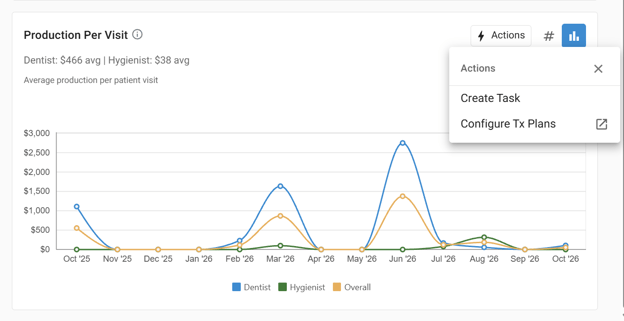
Production Per Visit Turns a Busy Schedule Into a Profitable One
A dip in Production Per Visit is the cue to open the Actions menu. This lines up a task list for the team and a direct route to the practice’s treatment plan settings, turning a soft month into a specific conversation about case size, not a mystery. Flex’s production reporting tools go deeper for practices ready to dig into the why.
How Can You Track New Patient Growth?
New Patients tracks not just the count, but the per-day average, so a slow week shows up before it becomes a slow quarter. It’s one of the clearest read-outs of whether marketing and referrals are converting into booked patients. When the number needs a boost, the same panel routes straight to configuring automated review requests or sending a FlexBlast email campaign, so the fix starts in the same place the problem appeared.
Where Is Your Cash Actually Sitting?
Collection Rate, Outstanding A/R, and Days in A/R answer the question every practice owner eventually asks: we’re busy, so where’s the money?
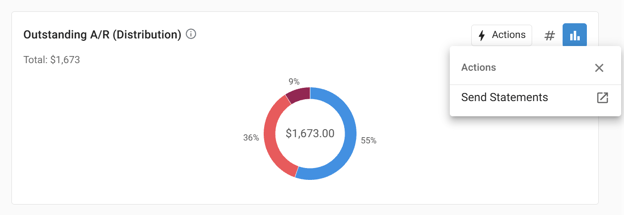
Collection Rate compares what’s collected to what’s owed, by provider type. Outstanding A/R breaks unpaid balances into 30, 60, and 90-day buckets, because a $496 balance behaves very differently depending on how long it’s been sitting. Days in A/R tracks the average time to get paid against a 12-month average, so a practice can see whether collections are trending better or worse, not just where they stand today.
The Balance: a $496 payment goes uncollected after a visit.
The 30-Day Mark: it ages into the first A/R bucket before anyone flags it by hand.
The Executive Dashboard: surfaces it that same month, so the billing team sends a statement today instead of writing it off after 90 days.
Early visibility drives the Send Statements and Automate Statements actions built into these panels: the dashboard doesn’t just report the problem, it hands your team the next move to solve it. Go deeper in Days in AR – The Heartbeat of Practice Health.
How Can Open Dental Practices Improve Case Acceptance?
Case Acceptance shows how much proposed treatment is being accepted, by provider type. It’s the metric most tied to what happens after the exam, and it connects directly to Part 3 of this series, where we’ll cover the Treatment Dashboard and the Advanced Patient List that allows you to text the exact patients sitting on unscheduled treatment. For now, know that a dip in Case Acceptance is your earliest signal, days before it would ever show up in month-end production reports.
How Does Flex Turn Dental Analytics Into Action?
The Executive Dashboard is the answer to one question: are the moves my practice makes on scheduling, payments, and insurance adding up? Because Flex reads your Open Dental data in real time, that answer doesn’t require a separate report or a request to IT. It’s already sitting in the dashboard, waiting for your team to take a look.
What would your team do with an honest answer instead of a guess? Find out, and Book a Demo with Flex today.
Frequently Asked Questions
What is the Flex Executive Dashboard? A real-time view of practice health built into Flex’s Insights, pulling straight from Open Dental to show production, new patients, collections, A/R, case acceptance, and production per visit across every clinic, so the answer is never a guess.
What metrics does the Executive Dashboard track? Adjusted Production, New Patients, Collection Rate, Outstanding A/R, Days in A/R, Case Acceptance, and Production Per Visit by provider, each viewable as a number or graph.
How often does the Executive Dashboard update? Daily. It reflects month-to-date activity as it happens, so you never have to wait for month-end to know where your practice stands.
Do I need FlexPayments to see every metric? No. Every metric is included with Insights in every Flex subscription. FlexPayments is what lets patients pay the statement on the spot, with the payment posting to Open Dental automatically at no extra cost.
Is the Executive Dashboard available now? Yes. Analytics with Insights by Flex is available in every Flex subscription.